HEASARC Data Finders and Catalog Access (gdt.core.heasarc)
Warning
HEASARC is currently experiencing a high load on their main HTTPS servers. Users experiencing issues should try switching to the AWS protocol described below.
Note that only a subset of HEASARC data are available on AWS. Users can manually check for data availability on AWS by copying a HEASARC directory path from the FTP servers and converting it to an AWS link like so:
https://heasarc.gsfc.nasa.gov/FTP/fermi/data/gbm/triggers/2025/bn250611560/current
becomes
which provides the list of available directory files in XML format.
Introduction
The High-Energy Astrophysics Science Archive Research Center (HEASARC) is a repository for data and catalogs for many high-energy astrophysics missions. Science and auxiliary data files are hosted on FTP and HTTPS servers, while a variety of catalogs are accessible via the HEASARC’s Browse interface. Additionally, a subset of HEASARC data are mirrored on Amazon Web Services.
The GDT provides a base class for accessing and navigating the directories of mission data, as well as a base class for interfacing with catalogs on HEASARC.
The BaseFinder Class
The BaseFinder in the GDT provides functionality for accessing, navigating,
and downloading data from HEASARC for a given mission. One problem with finding
the data you need for an investigation is that the directory structure for each
mission can be very different and may require different inputs. The BaseFinder
base class aims to fix this problem. For a given mission and data archive, the
important parameter may be a time or an observation ID or a trigger number. And
the directory structure may be organized such that navigating it manually is
a nuisance. By inheriting the BaseFinder and defining one function, we can
immediately access the data we need and download it for a given mission.
BaseFinder offers file access to the main HEASARC servers through either
HTTPS or FTP protocols. Additionally, an AWS protocol is available for accessing
the subset of HEASARC data mirrored on Amazon Web Services. Users should take
care when using the AWS protocol since not all HEASARC data is available through AWS
at this time. The default protocol is HTTPS, which is recommended due to its wider support
across secure networks as well as the higher reliability of HEASARC’s HTTPS
servers. If necessary, the protocol type can be selected manually by passing a
protocol keyword during initialization of classes derived from BaseFinder.
For Developers:
In this example, we will make a data finder for Fermi GBM trigger data. To
do so, we will inherit BaseFinder, define the root directory for the data
archive on the FTP server, and define a private function called
_construct_path() that will construct the correct directory path given the
required input parameters.
>>> import os
>>> from gdt.core.heasarc import BaseFinder
>>> class MyFinder(BaseFinder):
>>>     _root = '/fermi/data/gbm/triggers'
>>>
>>>     def _construct_path(self, str_trigger_num):
>>>         year = '20' + str_trigger_num[0:2]
>>>         path = os.path.join(self._root, year, 'bn' + str_trigger_num, 'current')
>>>         return path
In the _construct_path() method, we defined our input argument to be the
GBM trigger number (in string form), we have logic that constructs the proper
path to the data for the given trigger number, and it returns that path.
Examples
Now we can create an instance of MyFinder and initialize it with a
trigger number:
>>> finder = MyFinder('170817529')
>>> finder
<MyFinder: 170817529>
To see how many files or what files are available in the directory:
>>> finder.num_files
128
>>> finder.files
['glg_bcat_all_bn170817529_v01.fit',
 'glg_cspec_b0_bn170817529_v00.pha',
 'glg_cspec_b0_bn170817529_v04.rsp',
 'glg_cspec_b0_bn170817529_v04.rsp2',
 'glg_cspec_b1_bn170817529_v00.pha',
 ...]
As in this case, there are a lot of files in the directory, and perhaps you’re only interested in a certain file type. You can filter the files based on the file type and extension. For example, let’s list only GBM CTIME files:
>>> ctime_files = finder.filter('ctime', 'pha')
>>> ctime_files
['glg_ctime_b0_bn170817529_v00.pha',
 'glg_ctime_b1_bn170817529_v00.pha',
 'glg_ctime_n0_bn170817529_v00.pha',
 'glg_ctime_n1_bn170817529_v00.pha',
 'glg_ctime_n2_bn170817529_v00.pha',
 ...]
Of course you can download the files, which can be done once you’ve made the list of files you want to download.
>>> finder.get('the_download_dir', ctime_files)
This will download all the files listed in ctime_files to the directory
‘the_download_dir’.
You can also change to a different directory with the same object:
>>> finder.cd('080916009')
>>> finder
<MyFinder: 080916009>
If you don’t want to change directories but instead just list what is in a different directory, you can do that too:
>>> finder.ls('090510016')
['glg_bcat_all_bn090510016_v01.fit',
 'glg_cspec_b0_bn090510016_v00.pha',
 'glg_cspec_b0_bn090510016_v10.rsp',
 'glg_cspec_b1_bn090510016_v00.pha',
 'glg_cspec_b1_bn090510016_v00.rsp2',
 ...]
Finally, you can enable file transfer over FTP or AWS instead of HTTPS by setting the protocol keyword argument:
>>> finder = MyFinder('170817529', protocol='FTP')
>>> finder = MyFinder('170817529', protocol='AWS')
However, it is recommended that you use the default HTTPS setting for HEASARC.
The BrowseCatalog Class
BrowseCatalog enables easy access to HEASARC catalogs. You can retrieve
virtually any HEASARC catalog and perform operations on a local copy of the
catalog. The local operations are more efficient than continuous querying of
the online catalog, and a version of the catalog is cached so that you can
choose to perform future reads from your local disk rather than re-querying
HEASARC. You can choose to directly use the BrowseCatalog class or sub-class it
to add your own specialized functionality.
For Developers:
In this example, we will sub-class BrowseCatalog to create our own catalog
class for the GBM trigger catalog:
>>> from gdt.core.heasarc import BrowseCatalog
>>> class MyCatalog(BrowseCatalog):
>>>     def __init__(self, cache_path='.', **kwargs):
>>>         super().__init__(cache_path, table='fermigtrig', **kwargs)
The cache_path is the path where the cached catalog file will be saved, and
we have set it to our current directory by default. The table argument is
set to the HEASARC unique catalog identifier for the GBM trigger catalog.
Examples
Now we can create an instance of the catalog:
>>> cat = MyCatalog(verbose=True)
Sending request and awaiting response from HEASARC...
Downloading fermigtrig from HEASARC via w3query.pl...
Finished in 9 s
>>> cat
<MyCatalog: 29 columns, 8270 rows>
Now that we have retrieved the catalog, we can do a variety of operations. For example, if you want to know what columns are included in the catalog, you can access that:
>>> cat.columns
('VERSION',
 'TRIGGER_NAME',
 'NAME',
 'RA',
 'DEC',
 ...)
And perhaps you want to know the range of values contained in a column:
>>> # the range of trigger names
>>> cat.column_range('TRIGGER_NAME')
('BN080714086', 'BN220426299')
>>> # the range of localization error radius
>>> cat.column_range('ERROR_RADIUS')
(0.0, 93.54)
More importantly, let’s say you want to retrieve the trigger name, RA, and Dec for all of the triggers. You can retrieve those columns from the catalog and return it as a numpy record array:
>>> cat.get_table(columns=['TRIGGER_NAME', 'RA', 'DEC'])
rec.array([('BN120403857 ',  55.3384, -89.0093),
           ('BN140912846 ',  44.05  , -88.9333),
           ('BN120227725 ', 256.73  , -88.86  ), ...,
           ('BN110201399 ', 137.58  ,  88.6054),
           ('BN150705660 ', 257.75  ,  88.9167),
           ('BN220403863 ', 191.5   ,  89.1836)],
          dtype=[('TRIGGER_NAME', '<U12'), ('RA', '<f8'), ('DEC', '<f8')])
You can also take a row slice of the catalog based on column condition:
>>> # get all rows where loc error < 5 deg
>>> cat.slice('ERROR_RADIUS', hi=5.0)
<MyCatalog: 29 columns, 4208 rows>
>>> # get all rows where loc error is between 1 and 2 degrees
>>> cat.slice('ERROR_RADIUS', lo=1.0, hi=2.0)
<MyCatalog: 29 columns, 556 rows>
Notice that a new catalog object is returned so you can perform the same operations on the sliced catalog as you can with the original catalog object, If you want to perform a slice on the catalog using multiple column conditions, you would do something like this:
>>> # get all rows where the trigger is a GRB and loc err is < 5 deg
>>> cat.slices([('TRIGGER_TYPE', 'GRB', 'GRB'), ('ERROR_RADIUS', None, 5.0)])
<MyCatalog: 29 columns, 1962 rows>
The query using slices() is a bit different from that using the
simple slice method. We provide a list of 3-tuples, where each tuple contains
the values (<column name>, <low value>, <high value>). If either the low or
high value is not specified, then replace the value with None.
Finally, if you want to access the catalog later, but you don’t want to retrieve
it from HEASARC again, you can initialize the object with cached=True to
force the loading of the cached file:
>>> new_cat = MyCatalog(cached=True)
>>> new_cat
<MyCatalog: 29 columns, 8270 rows>
Note that this will only load the latest version of the catalog you downloaded from HEASARC, so if it is a catalog that you expect will be updated before your next use, you should still update from HEASARC.
Lower Level Classes
Developers looking for more direct interactions with HEASARC or other
remote servers are encouraged to use the lower level Http and Ftp
classes. These classes can download files from any URL without
additional formatting. A third FileDownloader class offers similar
download functionality without needing to specify the protocol. It
automatically determines the appropriate protocol based on the scheme
defined in the URL itself.
Examples
The following will download a file to the current directory using a HTTPS protocol with the Http class:
>>> from gdt.core.heasarc import Http
>>> http = Http()
>>> http.download_url('https://heasarc.gsfc.nasa.gov/FTP/fermi/data/gbm/bursts/2017/bn170817529/current/glg_trigdat_all_bn170817529_v01.fit', '.')
The same can be done using a FTP protocol with the Ftp class:
>>> from gdt.core.heasarc import Ftp
>>> ftp = Ftp()
>>> ftp.download_url('ftp://heasarc.gsfc.nasa.gov/fermi/data/gbm/bursts/2017/bn170817529/current/glg_trigdat_all_bn170817529_v01.fit', '.')
Note that the URL schemes ftp:// and https::// must match the protocol format of the Ftp and Http classes in these examples.
The FileDownloader class can download either URL scheme:
>>> from gdt.core.heasarc import FileDownloader
>>> downloader = FileDownloader()
>>> downloader.download_url('ftp://heasarc.gsfc.nasa.gov/fermi/data/gbm/bursts/2017/bn170817529/current/glg_trigdat_all_bn170817529_v01.fit', '.')
>>> downloader.download_url('https://heasarc.gsfc.nasa.gov/FTP/fermi/data/gbm/bursts/2017/bn170817529/current/glg_trigdat_all_bn170817529_v01.fit', '.')
See the documentation of these classes for additional functionality, including
the ability to download multiple files at once through methods like
Http.get(), Ftp.get(),
and FileDownloader.bulk_download().
Backwards Compatibility
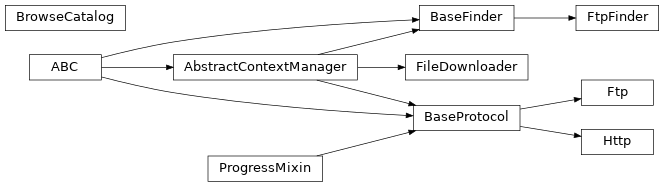
The FtpFinder class inherits from the BaseFinder class to define identical
FTP access support as the original FtpFinder class from API version 2.0.4 and
earlier. Existing code that depends on the FtpFinder class will still work
as intended, but we recommend migrating to the new BaseFinder class given the
wider support of HTTPS file transfer across secure networks and the higher
reliability of HEASARC’s HTTPS servers.
>>> import os
>>> from gdt.core.heasarc import FtpFinder
>>> class MyFtpFinder(FtpFinder):
>>> from gdt.core.heasarc import BaseFinder
>>> class MyFinder(BaseFinder):
>>>     _root = '/fermi/data/gbm/triggers'
>>>
>>>     def _construct_path(self, str_trigger_num):
>>>         year = '20' + str_trigger_num[0:2]
>>>         path = os.path.join(self._root, year, 'bn' + str_trigger_num, 'current')
>>>         return path
Reference/API
gdt.core.heasarc Module
Classes
A mixin class for providing progress bar behavior through inheritance |
|
|
A class for FTP interactions with a remote archive. |
|
A class for HTTP/HTTPS interactions with a remote archive. |
|
A base class for the interface to the HEASARC archive. |
|
Class providing backwards compatibility for code written prior to v2.0.5 where the FtpFinder handled most interactions with HEASARC |
|
Used to download a list of files given as a URL. |
|
A class that interfaces with the HEASARC Browse API. |
Class Inheritance Diagram