Simulation Generators (generators)
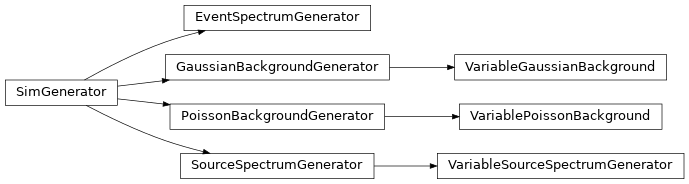
The simulation generators are the underlying random generators used by the GDT. The package contains generators for both background and source signals, as well as generators for stationary and non-stationary processes. Normally these are called directly but are instead used by the PHA and TTE simulators.
Stationary Generators
There are three generators provided for stationary (non-time-varying) processes:
PoissonBackgroundGenerator, GaussianBackgroundGenerator, and
SourceSpectrumGenerator. The first two, as their names suggest, are used
for generating Poisson and Gaussian background, respectively. The final
generator produces Poisson source spectra.
For the background generators, we must initialize them with a
BackgroundSpectrum object (see Background Primitives for more information on
creating and using background objects). As an example, we will create
BackgroundSpectrum with three energy channels:
>>> from gdt.core.background.primitives import BackgroundSpectrum
>>> rates = [37.5, 57.5, 17.5]
>>> rate_uncert = [1.896, 2.889, 0.919]
>>> emin = [10.0, 50.0, 150.0]
>>> emax = [50.0, 150., 300.0]
>>> exposure = 4.0
>>> back_spec = BackgroundSpectrum(rates, rate_uncert, emin, emax, exposure)
Now we can initialize a PoissonBackgroundGenerator:
>>> from gdt.core.simulate.generators import PoissonBackgroundGenerator
>>> gen = PoissonBackgroundGenerator(back_spec)
Because these are generators, we can produce random deviates one at a time or by use of iterators. Also note that this returns a new BackgroundSpectrum object.
>>> # generate one deviate at a time
>>> next(gen)
<BackgroundSpectrum: 3 bins;
 range (10.0, 300.0);
 1 contiguous segments>
 >>> next(gen).counts
 array([122., 254.,  82.])
 >>> next(gen).counts
 array([154., 248.,  67.])
>>> # generate 5 deviates
>>> [next(gen).counts for i in range(5)]
[array([139., 235.,  89.]),
 array([171., 236.,  83.]),
 array([156., 226.,  71.]),
 array([131., 227.,  73.]),
 array([130., 221.,  69.])]
Because we used the Poisson random generator, the rate uncertainty in the
BackgroundSpectrum object is ignored. The GaussianBackgroundGenerator
utilizes the rate uncertainty and is called in the same way:
>>> from gdt.core.simulate.generators import GaussianBackgroundGenerator
>>> gen = GaussianBackgroundGenerator(back_spec)
>>> [next(gen).counts for i in range(5)]
[array([151.78208027, 249.53694044,  70.02805299]),
 array([153.97842216, 223.21366532,  70.1612712 ]),
 array([157.26219523, 216.15423056,  68.06616171]),
 array([168.84682312, 234.86801206,  72.72010014]),
 array([148.82969865, 216.75423172,  69.06155739])]
Note that the counts are not integers since they are deviates from a Gaussian distribution. This is not a problem in practice because the fractional part of the count represents a binomial probability of rounding up to the next integer count.
Meanwhile, the SourceSpectrumGenerator is different in that it requires a
detector response, a photon model, and an exposure to be specified. For the
response, we will use the example constructed in The Rsp Class, and then we will use a
Band function (see Spectral Functions for more information on photon models).
>>> # already have defined the response (rsp)
>>> from gdt.core.spectra.functions import Band
>>> from gdt.core.simulate.generators import SourceSpectrumGenerator
>>> exposure = 0.256 # seconds
>>> band_params = (0.01, 300.0, -1.0, -2.8)
>>> gen = SourceSpectrumGenerator(rsp, Band(), band_params, exposure)
Now that our generator is initialized, we can generate deviates as we did above.
What is returned from this generator is an EnergyBins object containing the
source count spectrum.
>>> next(gen)
<EnergyBins: 4 bins;
 range (4.6, 2000.0);
 1 contiguous segments>
>>> [next(gen).counts for i in range(5)]
[array([21, 45, 24,  2]),
 array([26, 29, 12,  0]),
 array([32, 39, 29,  0]),
 array([21, 36, 18,  0]),
 array([28, 40, 20,  0])]
Non-stationary Generators
There are three generators provided for non-stationary (time-varying) processes:
VariablePoissonBackground, VariableGaussianBackground, and
VariableSourceSpectrumGenerator. Each of these are simply time-varying
versions of the generators described in the previous section with the same
inputs and outputs. The primary difference for these generators is that they
have an additional amp property that controls the overall amplitude of the
spectrum.
As an example, let us consider the VariablePoissonBackground. Using the same BackgroundSpectrum as we used above, we have:
>>> from gdt.core.simulate.generators import VariablePoissonBackground
>>> gen = VariablePoissonBackground(back_spec)
>>> gen.amp
1.0
The spectrum amplitude starts out at 1.0, which indicates no modification to
back_spec that we initialized the generator with. If we want to scale the
amplitude down, we choose a factor between 0 and 1, and if we want to scale the
amplitude up, we choose a factor greater than 1.
>>> next(gen).counts
array([158., 242.,  52.])
>>> # scale down by half
>>> gen.amp = 0.5
>>> next(gen)
array([ 74., 109.,  31.])
>>> # scale up by double
>>> gen.amp = 2.0
>>> next(gen)
array([308., 461., 137.])
This is often useful when needing to generate a smoothly varying background. For example, here is a monotonically increasing background:
>>> import numpy as np
>>> from gdt.core.simulate.generators import VariableGaussianBackground
>>> gen = VariableGaussianBackground(back_spec)
>>> amps = np.linspace(1.0, 2.0, 5)
>>> for i in range(5):
>>>     gen.amp = amps[i]
>>>     print(next(gen).counts)
[145.31379504 232.99347649  73.48606776]
[203.44744579 278.8084182   94.01676146]
[230.21400035 381.17235449 108.87338199]
[275.70872059 434.92589422 126.09284401]
[322.47071056 448.91324843 139.84965114]
And finally, we can do the same thing with a source spectrum:
>>> from gdt.core.simulate.generators import VariableSourceSpectrumGenerator
>>> gen = VariableSourceSpectrumGenerator(rsp, Band(), band_params, exposure)
>>> gen.amp
0.01
The one difference here is that the amplitude is defined by the amplitude of the photon spectrum, therefore changing the amplitude value represents an absolute change in the count spectrum amplitude rather than a relative change to the input spectrum as is the case for the background generators above.
>>> next(gen)
array([14, 36, 27,  1])
>>> # scale down by half
>>> gen.amp = 0.005
>>> next(gen).counts
array([17, 19, 12,  1])
>>> # scale up by double
>>> gen.amp = 0.02
>>> next(gen).counts
array([46, 64, 42,  2])
Event Generator
All generators previously discussed produce a time-integrated count spectrum.
We can use the results from those generators to generate Poisson events sampling
from that spectrum. To do that, we use the EventSpectrumGenerator, which
requires the count spectrum as an array and the duration over which the events
should be generated. In general, we often want to generate events from a
time-varying process, therefore the duration should be short, smaller than the
variability timescale of the process we’re simulating.
>>> from gdt.core.simulate.generators import EventSpectrumGenerator
>>> count_spec = np.array([17, 19, 12,  1])
>>> # duration of 1 microsecond
>>> gen = EventSpectrumGenerator(count_spec, 1e-6)
Now, when we generate a deviate, the generator returns two outputs: the timestamps of the events (relative to 0) and the corresponding channels each event belongs to.
>>> times, channels = next(gen)
>>> times
array([7.04931280e-09, 1.95609958e-08, 3.59259447e-08, 4.63927331e-08,
       7.44675927e-08, 9.32735289e-08, 1.30097727e-07, 1.30540715e-07,
       1.48487012e-07, 1.58971982e-07, 1.62517121e-07, 1.64038449e-07,
       3.31662103e-07, 3.60521335e-07, 3.61831687e-07, 3.71657726e-07,
       3.90096235e-07, 3.91158180e-07, 3.99279785e-07, 4.07058457e-07,
       4.22051030e-07, 4.33105495e-07, 4.49874647e-07, 5.27509018e-07,
       5.40521076e-07, 5.59684862e-07, 5.64229258e-07, 5.74299389e-07,
       5.98839363e-07, 6.44593252e-07, 6.46253463e-07, 6.55519637e-07,
       7.27613170e-07, 7.66563826e-07, 7.67683109e-07, 7.84325180e-07,
       7.92095865e-07, 8.15014920e-07, 8.55683135e-07, 8.56894618e-07,
       8.93823877e-07, 8.95595230e-07, 9.03290378e-07, 9.04434867e-07,
       9.16922477e-07, 9.23269820e-07, 9.45459400e-07, 9.80845020e-07,
       9.89771487e-07])
>>> channels
array([0, 0, 1, 0, 1, 2, 0, 3, 1, 0, 0, 0, 1, 1, 1, 0, 1, 1, 0, 1, 2, 2,
       2, 2, 1, 1, 0, 2, 0, 2, 1, 0, 2, 1, 1, 1, 1, 0, 0, 1, 2, 0, 2, 2,
       1, 0, 1, 0, 2])
We can update the spectrum to generate a new set of events for the next time slice:
>>> gen.spectrum
array([17, 19, 12,  1])
>>> gen.spectrum = np.array([46, 64, 42,  2])
And finally, we can specify a deadtime to apply when generating the events.
By default, the min_sep=0, defining the minimum time separation allowed
between events, but we can specify it on initialization:
>>> # minimum time separation between events of 2e-6.
>>> gen = EventSpectrumGenerator(count_spec, 1e-4, min_sep=2e-6)
>>> times, channels = next(gen)
>>> times
array([1.07596951e-07, 4.82135218e-06, 7.70724445e-06, 1.16266006e-05,
       1.74090487e-05, 2.00668988e-05, 2.83057705e-05, 3.36177889e-05,
       3.63672699e-05, 4.10932105e-05, 4.86272788e-05, 5.38226862e-05,
       5.83086804e-05, 6.10862109e-05, 6.86386986e-05, 7.44809644e-05,
       7.87360851e-05, 8.28061508e-05, 8.68345864e-05])
>>> channels
array([1, 2, 1, 2, 3, 1, 0, 1, 0, 2, 0, 1, 2, 1, 2, 0, 1, 1, 0])
Setting min_sep > 0 imposes a “dead time” during which events cannot be
recorded which simulated the real deadtime experience by real detectors and
will affect the observed count rate for relatively high rates.
Setting Generator Seeds
Users can set the seed used by each random generator object with a
rng keyword when initializing the class:
>>> import numpy as np
>>> rng = np.random.default_rng(seed=1)
>>>
>>> from gdt.core.simulate.generators import EventSpectrumGenerator
>>> count_spec = np.array([17, 19, 12,  1])
>>> gen = EventSpectrumGenerator(count_spec, 1e-6, rng=rng)
This is useful in cases where reproducibility with a known seed is desired, such as for publicly shared simulation results.
Additionally, the random generator seed can be modified after initialization
with the set_rng() function:
>>> gen.set_rng(rng)
In cases where the user does not seed the generator class it
will use np.random.default_rng() to create a seed from the computer’s clock time.
This will produce a different result whenever the simulation is performed at a different time.
Simulations run at the same time will produce the same result, which can be problematic for users
trying to run simulations as parallel processes. To avoid this, users should
provide unique seeds to each simulation process when running in parallel.
See Seeding Event Data and Seeding PHA Data
for parallel processing examples.
Reference/API
gdt.core.simulate.generators Module
Classes
|
Base class for a simulation generator |
|
Simulation generator producing Poisson arrival times for a source spectrum during a finite slice of time. |
|
Simulation generator for Gaussian Background. |
|
Simulation generator for Poisson Background. |
|
Simulation generator for a Poisson source spectrum. |
|
Simulation generator for a variable Gaussian Background. |
|
Simulation generator for a variable Poisson Background. |
|
Simulation generator for a Poisson source spectrum, efficient for generating deviates when the source spectrum amplitude changes. |
Class Inheritance Diagram